
Districts with the MUNIS Applicant Tracking module can export new hire data from Applicant Tracking and import it into MUNIS through the XML Import process. The export can be run as needed and supports exporting all eligible new hires or selected applicants.
Munis Export is a custom export tool. To enable Munis Export, contact PowerSchool support.
Districts can run the export manually whenever they need a new hire data file or export selected applicants using the Munis Export bulk action from the Application Manager page. This export is available only for districts with the Munis Applicant Tracking module.
Export new hire data
Use the following workflow to export new hire information and import it into Munis:
-
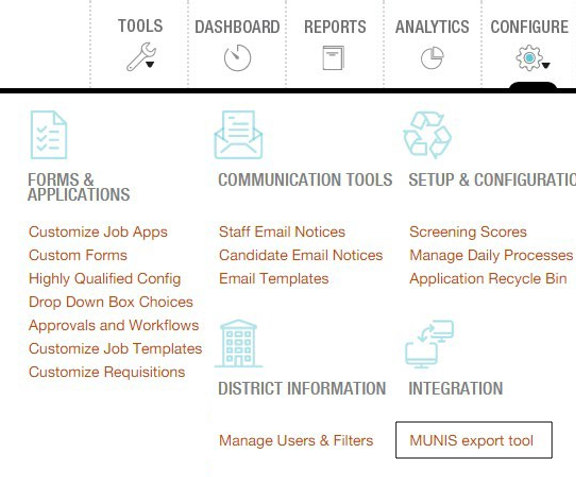
In Applicant Tracking, go to the Configure menu.
-
Under the Integration section, select Munis Export Tool:
-
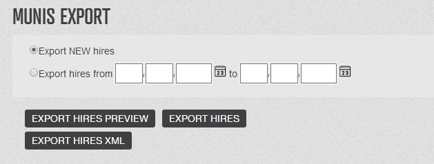
Choose the export option that matches the new hire records you want to include:
-
-
Export NEW Hires: Exports all applicants hired since the last export.
-
Export Hires From: Exports applicants hired within a specified date range.
-
Export Hires Preview: Generates a preview file without updating the last export date.
-
Export Hires: Generates a TXT file and updates the last export date.
-
Export Hires XML: Generates an XML file and updates the last export date.
-
4. Save the export file.
Import data into MUNIS
-
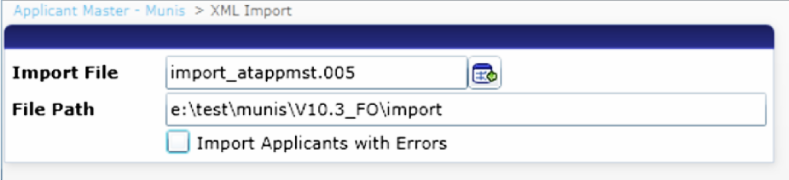
Open the MUNIS XML Import menu.
-
Import the saved export file.
-
Recommend the candidate for the appropriate position.
-
Follow the district's MUNIS workflow to move the new hire into the Human Resources Management module.
Bulk export new hire data
Districts can also export specific new hires from the Application Manager page.
To export selected new hires:
-
Open the Application Manager page.
-
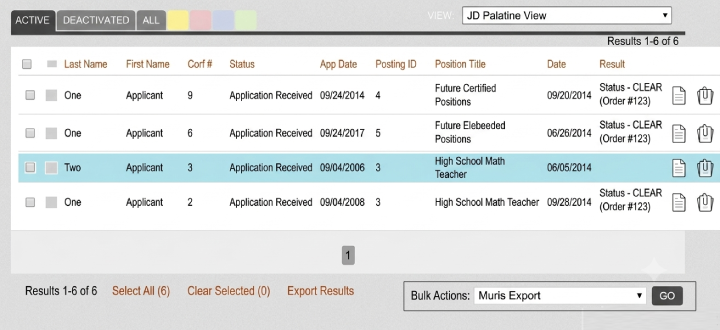
Select the new hire records to include in the export.
-
From the Bulk Actions drop-down list, select Munis Export:
-
To generate new hire data in bulk, click GO.
Exported New Hire Data
The standard MUNIS export includes the following fields:
-
First Name
-
Middle Initial
-
Last Name
-
Phone Number
-
Date of Birth
-
Address 1
-
Address 2
-
City
-
State
-
ZIP Code
-
Gender
-
Full-Time/Part-Time Status
-
Hire Date
-
Ethnicity
-
American Indian Indicator
-
Asian Indicator
-
Black Indicator
-
Native Hawaiian Indicator
-
White Indicator
Additional export fields include:
-
Job Group
-
Location
-
Job Class
If values are not available, these fields are exported as blank fields.
Trademarks
Munis® and iVisions® are also registered trademarks of Tyler Technologies, Inc. All product names referenced are the property of their respective owners and are used here for identification purposes only.