
The Job Postings report displays job posting data in a customizable table. You can filter by date range, customize columns, apply specific criteria to filter data you need, and generate reports for download.
Navigation: Reports, Job Posting Dashboard, and then Reports
View reports
Step 1: Choose the date range:
-
-
Past 7 Days – Last 7 days of postings
-
Past 15 Days – Last 15 days of postings
-
Past 30 Days – Last 30 days (default)
-
Past 3 Months – Last 3 months of postings
-
Past 6 Months – Last 6 months of postings
-
Custom Date – Set your own start and end dates
-
Step 2: Customize columns
Click Show/Hide Columns to select the columns to display:
-
-
Select All – Shows/hides all columns at once
-
Select individual columns. For example, Job Title, Employer ID, Employer Name, Employer City, etc.
-
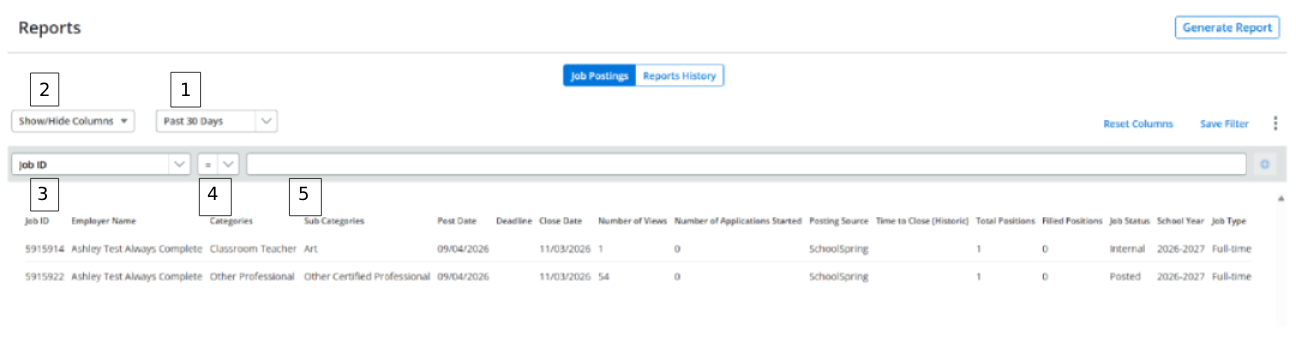
Step 3: Set column filters
Click the filter column header and choose the filter. For example, Job ID.
Step 4: Set the filter operator
After selecting a column, choose how you want to compare the data.
Select from these comparison operators:
-
-
= – Exactly matches the value (default)
-
≥ – Greater than or equal to
-
> – Greater than
-
< – Less than
-
≤ – Less than or equal to
-
Range – Between two values
-
Depending on your operator selection:
-
-
For single operators, =, ≥, >, <, or ≤, enter a single value.
-
For Range – enter the Above and Below values.
-
Step 5: Enter filter value.
Type your filter value in the text field next to the operator and click the plus sign icon to apply the filter.
Examples:
-
-
Filter by Employer Name = "Lincoln High School"
-
Filter by Number of Views ≥ 100
-
Filter by Post Date within a custom range
-
Managing filters
Save a filter
-
After applying filters, click Save Filter to reuse this filter
Reset columns
-
Click Reset Columns to restore default column visibility (filters remain active)
Switch tabs
-
Reports History - to view previously generated reports
-
Click Job Postings to return to the main report view
Download reports
Step 1: Choose the date range:
-
-
Past 7 Days – Last 7 days of postings
-
Past 15 Days – Last 15 days of postings
-
Past 30 Days – Last 30 days (default)
-
Past 3 Months – Last 3 months of postings
-
Past 6 Months – Last 6 months of postings
-
Custom Date – Set your own start and end dates
-
Step 2: Click Generate Report (top right) and enter a unique name for your report.
Step 3: Customize columns:
-
Select All – Shows/hides all columns at once
-
Select individual columns. For example, Job Title, Employer ID, Employer Name, Employer City, etc.
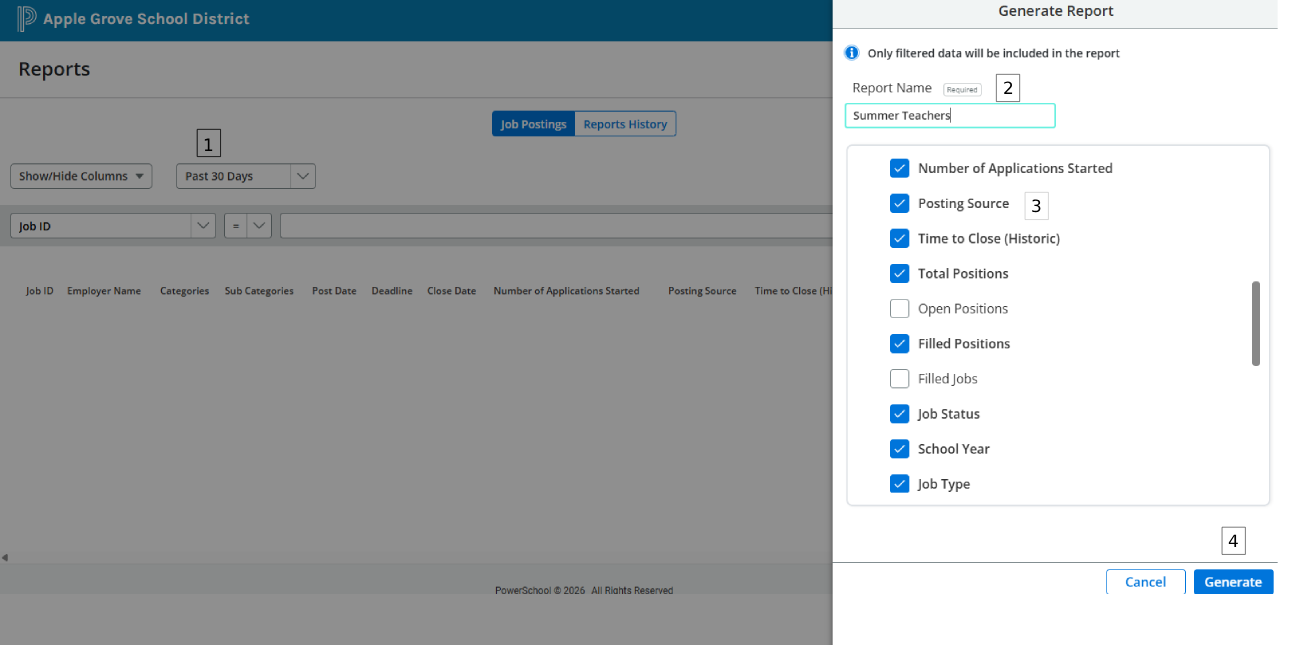
Step 4: Click Generate. The generated report displays in the Reports History tab.
Report columns
|
Column |
Description |
|---|---|
|
Job ID |
Unique identifier assigned to the job posting. |
|
Employer Name |
Name of the school or district posting the position. |
|
Categories |
Primary job classification (for example, Teaching, Administration). |
|
Sub Categories |
Secondary classification for more specific job categorization. |
|
Post Date |
Date the job posting was published. |
|
Deadline |
Application submission deadline date. |
|
Close Date |
Date the position was closed. |
|
Number of Views |
Total number of times the job posting was viewed. |
|
Number of Applications Started |
Total number of applications initiated (including unsubmitted drafts). |
|
Posting Source |
Source where the job was posted (for example, SchoolSpring, external job board). |
|
Time to Close (Historic) |
Historical average number of days required to fill similar positions. |
|
Total Positions |
Total number of open positions for the posting. |
|
Filled Positions |
Number of positions that have been filled to date. |
|
Job Status |
Current status of the job posting (Open, Closed, On Hold). |
|
School Year |
Applicable academic year for the posting. |
|
Job Type |
Type of employment (Full-time, Part-time, Temporary). |
|
Job Location Name |
Name of the specific job location |
|
Job Location City |
City of the job location |
|
Job Location State |
State of the job location |
|
Job Location Country |
Country of the job location |
|
Info URL |
Web link to additional job posting information |
|
Minimum Pay |
Lowest salary offered for the position |
|
Maximum Pay |
Highest salary offered for the position |
|
Job Pay Type |
Salary structure (Annual, Hourly, etc.) |
|
Minimum References |
Minimum number of references required |
|
Maximum References |
Maximum number of references accepted |
|
Requirements |
Required qualifications or certifications for the position |
|
Description |
Full job description and responsibilities |
|
Degree Preferred |
Preferred educational degree or certification |
|
Experience Required |
Required years or type of experience for the position |