
What data analytics and reporting are available in Coaching & Mentoring?
Coaching & Mentoring provides a data dashboard that displays aggregated mentor and mentee activity by school year. To view data from a previous year, select the appropriate school year from the dashboard.
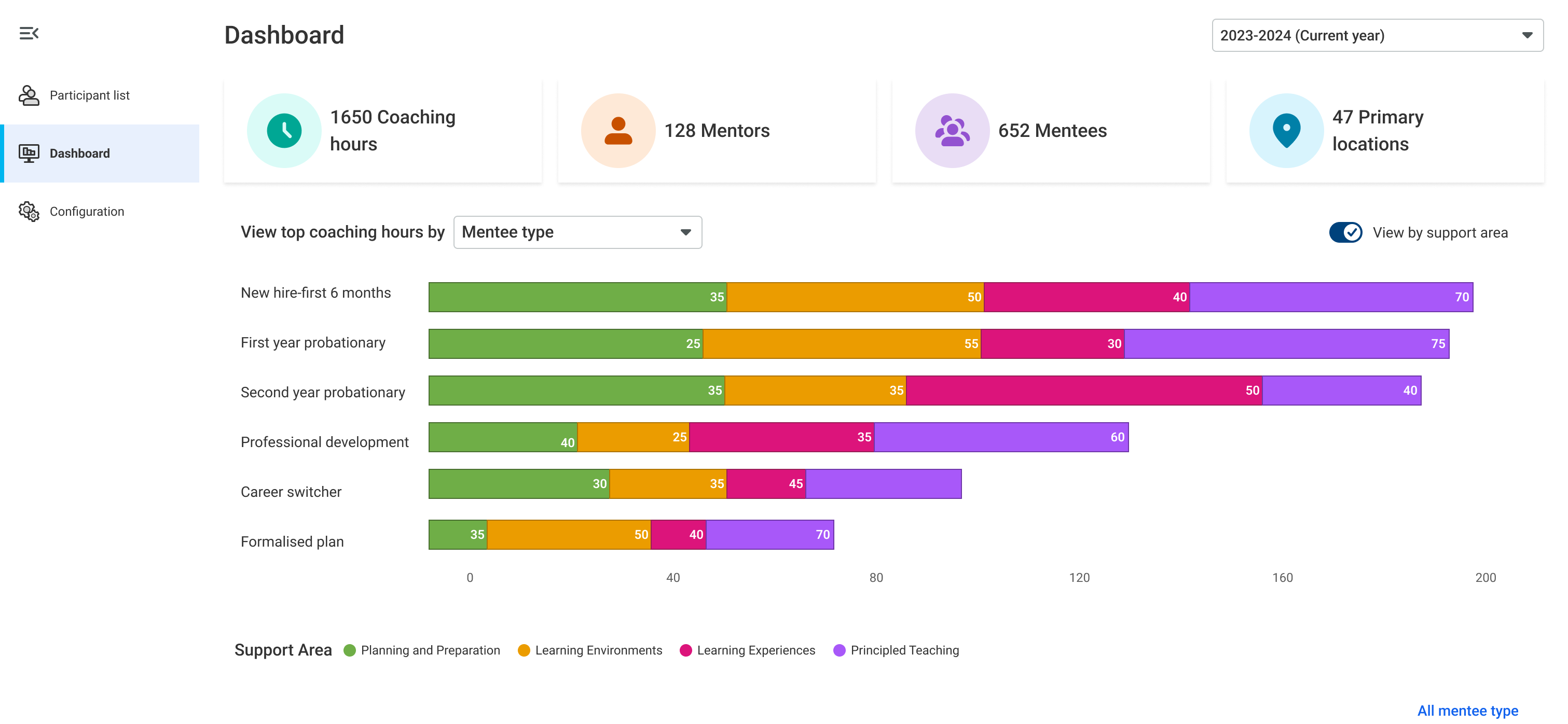
The dashboard includes reporting categories for mentoring hours by location, support area, mentor, mentee type, and program. Each category includes a detail page with download options. Some categories, including mentoring hours by mentor, mentee type, and location, also provide drill-down access to individual-level data.
What does each reporting category include?
By location: Data is aggregated across mentors and mentees using their primary location information. The detail page provides a drill-down view of mentors and mentees at each location, along with a download option. This report can help districts review mentoring hours by location or school.
By support area: Data is aggregated by the support areas defined in your district’s mentoring framework. This allows users to review how mentoring time is distributed across different areas of support.
By mentor: Data is aggregated for each mentor across all assigned mentees and locations. The detail page provides a drill-down view of each mentor’s mentees, along with a download option. This report can help districts review mentoring activity for mentors who support multiple mentees.
By mentee type: Data is aggregated by mentee type. The detail page provides a drill-down view of mentees and their related data within each mentee type, along with a download option. This report can help districts review mentee activity across multiple mentors.
How do I report on mentees across multiple mentors?
Use the By mentee type reporting category to review mentee activity across multiple mentors. From the detail page, you can drill down to view mentees and their related data within each mentee type. A download option is also available.
How do I report on mentors across multiple mentees?
Use the By mentor reporting category to review mentor activity across multiple mentees. From the detail page, you can drill down to view all mentees assigned to each mentor. A download option is also available.
How do I see which lead mentors have not uploaded their mentor and mentee lists?
A data auditing feature is not currently available in Coaching & Mentoring. To request this functionality, submit an idea through the PowerSchool Idea Portal so it can be considered for a future enhancement.