
New Customers and Early Adopters (Refreshed User Experience)
-
Key workflows are not changing.
-
New customers will be implemented on the refreshed workspace starting in August 2026.
-
Existing customers may sign up as early adopters starting in August 2026.
-
Exisiting customers that do not wish to sign up as an early adopter may switch to the refreshed interface at any point before 2027.
-
All changes listed in the 26.7.0 release apply to the Refreshed version.
About the Refreshed Version:
We are excited to announce updates to the Applicant Tracking System (ATS) Admin Workspace. We have modernized the ATS Admin Workspace to an enhanced design system so district administrators get a cleaner, more intuitive, and more consistent experience when managing hiring. The new interface improves the overall usability for mobile devices and meets WCAG 2.1 AA Compliance. This benefits all users, including keyboard and screen‑reader users.
Key Changes
-
Blue Folder Tabs (References, background, Screening, Begin Hire, etc) have been modernized so recruiters can reliably move candidates through every step.
-
Primary actions have been standardized across the product, with a consistent top‑right placement, while outdated “Exit” buttons have been removed.
-
Success messages and dialogs have been improved for clarity and consistency.
-
Configuration, setup, reporting, analytics, and dashboard pages now meet WCAG 2.2 A/AA accessibility standards.
Navigation has been streamlined:
-
The default landing page is now the modern user dashboard.
-
Sourcing is surfaced directly in the menu.
-
Recruiting has been renamed to Recruiting Events.
-
Product Help is available from a dedicated header icon.
Below is a summary of changes as well as a visual for the Refreshed Version.
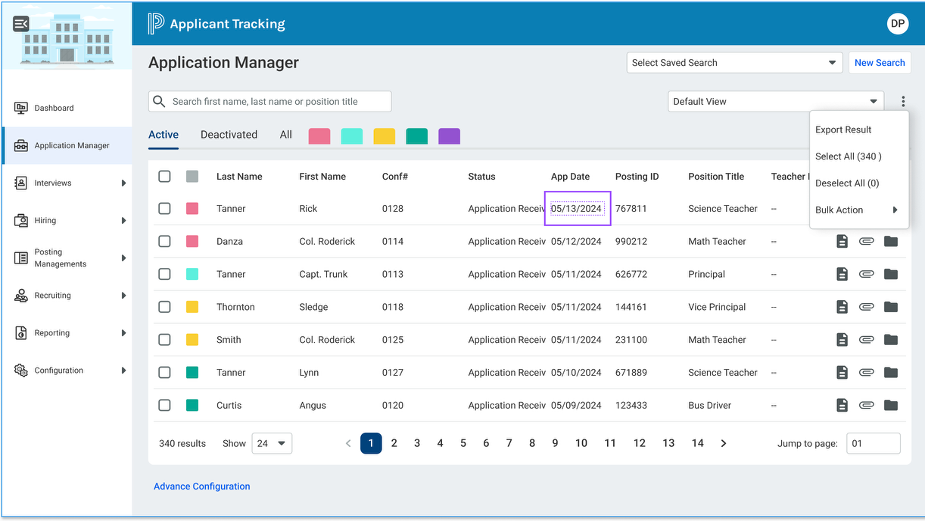
Summary of changes:
|
Area |
Current Version |
Refreshed Version |
|---|---|---|
|
Job Posting Menu |
Tools > Job Posting |
Positing Management > Job Posting |
|
Requisition Menu |
Tools > Requisition |
Posting Management > Requisition |
|
Requisition Approval Menu |
Tools > Requisition Approval |
Posting Management > Requisition Approval |
|
Bulk Scan Supporting Documents |
Tools > Bulk Scan Supporting Documents |
Configuration > Bulk Scan Supporting Documents |
|
My Interviews |
Tools > My Interviews |
Interviews > My Interviews |
|
Manage Availability |
Tools > My Interviews > Manage Availability |
Interviews > Manage Availability |
|
Hiring Approvals |
Tools > Hiring Approvals |
Hiring > Hiring Approvals |
|
Job Offer Statues |
Tools > Job Offer Statuses |
Hiring > Job Offer Statuses |
|
Document Library |
Tools > Document Library |
Configuration > Document Library |
|
Job Fairs |
Tools > Job Fairs |
Recruiting Events > Job Fairs |
|
Career Days |
Tools > Career Days |
Recruiting Events > Career Days |
|
Exchange |
Tools > Exchange |
Configuration > Forms Exchange |
|
Reports |
Reports |
Reporting > Reports |
|
Analytics |
Analytics |
Reporting > Application Analytics |
|
Job Posting |
Reports > Job posting dashboard |
Reporting > Job posting dashboard |