
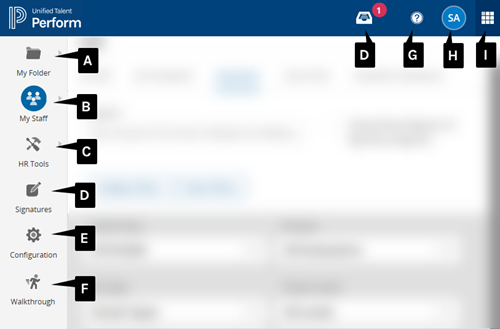
Once you log into Perform, the main navigation will include one or more of the following options, depending on your role.
-
My Folder: As a direct report, view your evaluation tasks.
-
My Staff: As an evaluator, work with the direct reports you are evaluating.
-
HR Tools: As an HR staff member, work with staff members across the organization.
-
Signatures: Electronically sign or approve forms.
-
Configuration: As a system administrator, perform system configuration tasks.
-
Walkthrough: If enabled, perform a walkthrough for any staff member.
-
Help: Find instructions for completing the most common tasks in Perform.
-
Profile: View and update your account information and log out of the application.
-
App Switcher: Quickly access your account in other PowerSchool applications used by your organization.
Additional options that may be enabled for your organization:
-
Peer Reviews: Complete assigned peer feedback forms.
-
Calibrations: Complete assigned calibration exercises.